Blog
Monday, Sep 21The Password Was ‘Password123
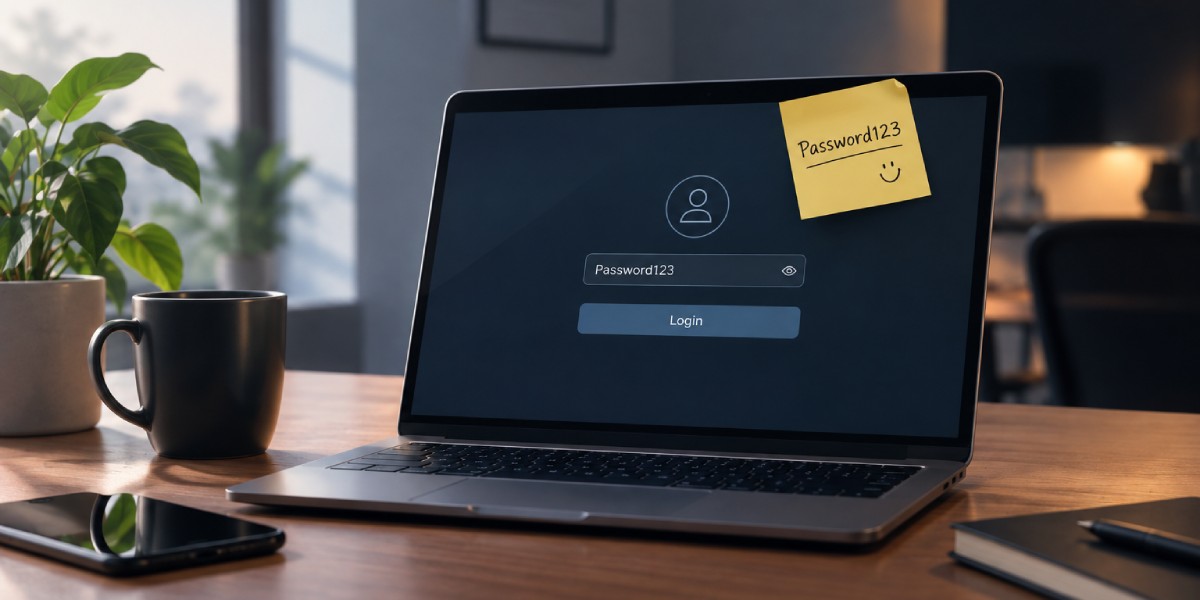
It was 9:12 AM on a Monday morning.
The office was slowly waking up.
Someone was making coffee. Someone was already checking emails. Someone was staring at their screen with the kind of expression that suggested they had been working for three hours, even though they had arrived eight minutes ago.
It was a completely normal Monday.
Until someone asked a very simple question.
“Does anyone know the admin password?”
A few keyboards stopped clicking.
Someone looked up from their monitor.
Someone else looked around the room.
Then, from the other side of the office, came the answer.
“Yeah. Password123.”
Silence.
Not the shocked kind of silence.
The comfortable kind.
The kind that says, Of course it is.
The person asking for the password typed it in.
Login successful.
Problem solved.
Except there was a much bigger problem.
Everyone knew the password.
The receptionist knew it.
The marketing team knew it.
The developer knew it.
The new employee who had joined two weeks ago knew it.
And, most likely, three former employees knew it too.
Nobody had hacked the company.
Nobody had stolen anything.
Nobody had received a suspicious email.
Nothing had gone wrong.
Yet.
And that little word yet is where this story really begins.
Everyone Knew the Password
The password hadn't always been shared with everyone.
It started innocently enough.
Someone created the website.
Someone needed access to manage it.
A simple password was created because, well, nobody wanted to forget it.
Then another employee needed access.
“Just give them the password.”
A new person joined the team.
“Just give them the password.”
Someone needed to make an urgent update after office hours.
“Just give them the password.”
Eventually, the password stopped belonging to one person.
It belonged to everyone.
And once everyone has access, nobody really feels responsible for protecting that access.
That's the strange thing about shared passwords.
When something belongs to everyone, it can start feeling like it belongs to nobody.
The password was also convenient.
It was short.
It was easy to type.
It was easy to remember.
There was no need for a password manager.
No need to write anything down.
No need to ask anyone.
No need to reset it every few months.
Just type Password123 and get on with the day.
From a productivity perspective, it was perfect.
From a security perspective?
Not so much.
“But It Has Always Worked”
A few months earlier, someone had suggested changing the password.
The suggestion lasted approximately thirty seconds.
“Why?”
Nobody had a particularly good answer.
“Because it's not secure.”
“Has anything happened?”
“No.”
“Then why change it?”
And that was the end of the conversation.
This is one of the biggest problems with cybersecurity.
People often take security seriously after something happens.
Not before.
A business can go months or even years without experiencing an obvious security incident. That doesn't necessarily mean everything is secure.
It may simply mean nothing has gone wrong yet.
It's a little like leaving your office door unlocked every night and saying:
“It's fine. Nobody has entered so far.”
Maybe nobody has.
But that doesn't make leaving the door unlocked a good security strategy.
The same applies to passwords.
A weak password doesn't become strong because nobody has guessed it yet.
It just means nobody has taken advantage of it.
The Password Had a Life of Its Own
By now, the password had travelled.
It had been sent through chat messages.
It had been mentioned during meetings.
It had probably been written on a piece of paper at some point.
Someone had saved it in a browser.
Someone else had probably stored it in their phone.
And there was a very good chance that nobody remembered exactly who had access to it anymore.
That is where a simple password problem becomes an access-control problem.
Because the question is no longer:
“What is the password?”
The real questions become:
Who knows the password?
Who still needs access?
Who shouldn't have access anymore?
Has the password ever been changed?
Was it used anywhere else?
Can we see who logged in?
Suddenly, “Password123” doesn't look like a simple password anymore.
It looks like the beginning of an investigation.
Then Someone Left the Company
A few months later, one employee left the company.
Nothing unusual.
The employee returned the laptop, completed the necessary paperwork, said goodbye to everyone and moved on.
But there was one thing nobody thought about.
The password.
The employee knew it.
So did several others.
Nobody changed it.
Why would they?
The person had left.
Their individual account was disabled.
The problem seemed solved.
Except the employee didn't have an individual password.
They had the same password everyone else had.
And that is exactly why shared credentials can become dangerous.
Removing someone's individual account doesn't help much if that person still knows the shared administrator password.
There is no simple way to say:
“Please forget the password.”
And there is certainly no magical button that removes the password from someone's memory.
The only practical solution?
Change it.
But nobody did.
Monday Morning Changed Everything
A few weeks later, it was Monday again.
The website was working.
Emails were working.
The office was busy.
Then the marketing team noticed something strange.
There was a new login notification.
Nobody remembered logging in.
At first, nobody panicked.
Maybe it was a developer.
Maybe it was a system process.
Maybe someone had logged in earlier.
Then another notification appeared.
And another.
Someone checked the website administration panel.
Everything looked normal.
Mostly.
One setting had changed.
Then another.
Nothing catastrophic.
Nothing dramatic.
Just a few things that nobody remembered changing.
That's when the room became quiet.
Someone asked:
“Who logged in?”
Nobody knew.
“Who has the password?”
Everyone looked at everyone else.
And suddenly, the thing that had seemed convenient for months became the biggest problem in the room.
The Problem Was Bigger Than One Password
At this point, it would be easy to blame Password123.
And yes, it was a terrible password.
But the bigger issue was the system around it.
The business had no clear access structure.
People were sharing credentials.
Former employees might still know the password.
There was no clear record of who had administrator access.
There was no reason for everyone to have the same level of permission.
And nobody had seriously reviewed the access setup for a long time.
That's an important lesson.
Cybersecurity isn't only about having a strong password.
It's about building multiple layers of protection around your digital systems.
A strong password is a good beginning.
It shouldn't be the entire strategy.
Your Website Doesn't Need Everyone to Be an Administrator
Here's a simple question:
Why should everyone have administrator-level access?
They shouldn't.
A person who updates blog posts doesn't necessarily need access to website settings.
A designer doesn't necessarily need access to user management.
A content editor doesn't need access to server configuration.
A marketing employee doesn't need access to everything simply because they need to upload a banner.
Different people have different responsibilities.
Their access should reflect that.
This is one of the basic principles of good access management:
Give people the access they need and no more than they need.
It sounds simple.
And it is.
But simple doesn't always mean common.
One Key for Every Door Is Still One Key
Imagine an office building where the same key opens everything.
The front door?
Same key.
Finance room?
Same key.
Server room?
Same key.
Director's office?
Same key.
Storage room?
Same key.
Now imagine giving that key to twenty people.
And then imagine that three of those twenty people leave the company.
Would you continue using the same key?
Probably not.
You'd change the locks.
Digital systems work in a similar way.
If everyone uses the same administrator credentials, one compromised account can potentially become a much bigger problem.
That's why individual user accounts and role-based permissions matter.
They make it easier to control access, identify users, remove access when someone leaves and understand who did what.
Then There Is the Password You Use Everywhere
The situation gets even worse when the same password is used for multiple accounts.
Let's say someone uses Password123 for their website administrator account.
They also use it for email.
And their social media account.
And perhaps another online service.
Now imagine that password is exposed somewhere.
The problem is no longer limited to the website.
One password can potentially become a key to multiple doors.
This is why security professionals repeatedly recommend using unique passwords for important accounts.
If one password is compromised, it shouldn't automatically compromise everything else.
It may be slightly less convenient.
But security is often about choosing a little inconvenience now instead of a much bigger problem later.
Strong Passwords Don't Have to Be Impossible to Remember
A common reaction to strong passwords is:
“But how am I supposed to remember all of them?”
That's a fair question.
Nobody wants to remember twenty different combinations of random letters, numbers and symbols.
That's where password managers can help.
Instead of remembering dozens of passwords, a person can use a password manager to securely store unique credentials.
The goal isn't to create one complicated password and use it everywhere.
The goal is almost the opposite:
Use different passwords for different important accounts.
That way, one compromised password doesn't automatically become a master key.
And Then There Is MFA
Let's say the company finally creates a strong password.
Great.
But what happens if someone still manages to obtain it?
That's where multi-factor authentication (MFA) adds another layer.
MFA requires an additional verification step beyond the password.
Depending on the system, that might involve an authentication app, security key, or another approved verification method.
Think about it like this.
Your password is one lock.
MFA adds another.
If someone gets through the first lock, they still have another barrier in the way.
For important systems such as administrator accounts, business email, hosting platforms and other critical services, that additional layer can be extremely valuable.
Backups: Because Sometimes Things Go Very Wrong
By this point, the team had another question.
“What if something actually happens?”
That's where backups enter the story.
Because even with strong passwords, MFA and access controls, no digital system should be treated as completely immune to problems.
Websites can be attacked.
Files can be deleted.
Updates can fail.
Human mistakes happen.
Servers can experience problems.
Sometimes someone simply clicks the wrong thing.
A reliable backup can turn a disaster into a recovery process.
But there's an important difference between having a backup and having a backup you can actually restore.
A backup that has never been tested is a little like carrying an umbrella that you've never opened.
You assume it works.
Until it rains.
Security Is Also About Updates
Backups aren't the only thing businesses sometimes postpone.
Software updates are another common example.
“Let's update it later.”
Later becomes tomorrow.
Tomorrow becomes next week.
Next week becomes next month.
Eventually, nobody remembers why the update was postponed in the first place.
Keeping website platforms, plugins, frameworks, servers and other software updated is an important part of maintaining security because updates can include fixes for known vulnerabilities.
Of course, updates should be handled carefully.
A responsible process includes checking compatibility, taking appropriate backups and testing changes.
But ignoring updates indefinitely isn't a strategy either.
It's just postponing the problem.
The Human Factor Is Still the Biggest Plot Twist
Here's the uncomfortable part.
Even the best technology can struggle against a person who clicks the wrong link.
A company can have strong passwords.
MFA.
Firewalls.
Backups.
Monitoring.
Security tools.
And then someone receives an email saying:
“URGENT: Your account will be deleted today. Click here immediately.”
And clicks it.
Technology matters.
But people matter too.
That is why basic security awareness is important.
Employees should know how to recognize suspicious messages, protect credentials, avoid sharing passwords and report unusual activity.
Because sometimes the weakest point in a security system isn't the server.
It's the person sitting in front of the screen.
And honestly?
We've all been that person at least once.
What Should Have Happened From the Beginning?
Let's go back to that Monday morning.
Someone asks:
“Does anyone know the admin password?”
This time, the answer is different.
“No. You need your own account.”
The administrator has an administrator account.
The content editor has a content account.
The developer has the access required for development and maintenance.
Former employees no longer have access.
Important accounts use MFA.
Passwords are unique and securely managed.
Backups are maintained and tested.
Software is kept up to date.
Access is reviewed regularly.
Nobody writes the administrator password on a sticky note and puts it under the keyboard.
And nobody says:
“It's okay. We've always done it this way.”
That last one might actually be the most important change of all.
The Real Cost of “We'll Fix It Later”
Cybersecurity often feels invisible when everything is working.
Nobody celebrates a website that wasn't hacked.
Nobody holds a meeting because an employee successfully avoided a phishing email.
Nobody posts on social media because a backup worked exactly as expected.
When security works, nothing happens.
And that's the point.
The problem is that businesses can sometimes interpret “nothing happened” as “nothing needs to be done.”
Until something happens.
Then the conversation changes very quickly.
The cost isn't only technical.
There can be downtime.
Lost productivity.
Recovery costs.
Reputation damage.
Customer concerns.
Data loss.
And, depending on the situation, serious legal or regulatory consequences.
A few minutes spent improving security can be much cheaper than trying to recover after a major incident.
So, What Happened to Password123?
The company changed it.
Obviously.
But they didn't simply replace Password123 with Password124 and call it a day.
That would defeat the entire purpose.
They reviewed who had access.
They removed unnecessary accounts.
They created individual user access where appropriate.
They enabled MFA on important accounts.
They reviewed their backup process.
They updated their systems.
And they finally had a conversation that should have happened much earlier:
Who actually needs access to what?
The answer was surprisingly simple.
Not everyone needed everything.
And that changed the way the company thought about security.
Your Business Is More Digital Than You Think
A modern business can have dozens of digital doors.
The website.
Business email.
Hosting.
Domain management.
Social media.
Cloud storage.
Accounting platforms.
Customer management systems.
Payment services.
Internal tools.
Analytics.
And countless other services.
Each one can contain valuable information or provide access to something important.
That means cybersecurity isn't only an IT department's concern.
It is a business concern.
Because when your business depends on digital systems, protecting those systems becomes part of protecting the business itself.
The Best Security Habit Is Not Waiting for a Problem
You don't need to wait for a suspicious login.
You don't need to wait for your website to go offline.
You don't need to wait for an employee to accidentally expose sensitive information.
You don't need to wait until someone asks:
“Why is the website showing something strange?”
Security is much easier when it becomes part of normal business practice.
Review access regularly.
Use strong, unique passwords.
Enable MFA.
Keep software updated.
Maintain reliable backups.
Limit unnecessary permissions.
Train employees.
Monitor important systems.
And when something looks unusual, investigate it.
Not tomorrow.
Not after the next meeting.
Not when someone gets around to it.
When something looks wrong, pay attention.
Because the Password Might Not Be Password123
Maybe your business doesn't use Password123.
Maybe your password is longer.
Maybe it contains numbers, symbols and a combination nobody could possibly guess.
That's good.
But cybersecurity doesn't end there.
Because the question isn't only:
“How strong is the password?”
It's also:
Who knows it?
Where is it stored?
Is it reused?
Who has access?
What happens when an employee leaves?
Is MFA enabled?
Are backups available?
Are systems updated?
Can unusual activity be detected?
A secure digital environment is built from many small decisions.
The password is just one of them.
One Last Question
Let's return to that Monday morning.
Someone walks into the office.
They sit down.
They open their computer.
They need to access the website.
And they ask:
“What's the admin password?”
Would your team answer with a password?
Or would they answer:
“You have your own account.”
That difference might sound small.
It isn't.
Because good cybersecurity isn't about making technology complicated.
It's about making the right things difficult for the wrong people while keeping the right things simple for the right people.
And if your entire security system still depends on one password that everyone knows...
Maybe it's time to retire Password123.
Before it becomes the most memorable employee your company ever had.
Your website should work as hard as your business does. Build it, maintain it and protect it with the right digital foundation.